Laser marking on rounded objects (rotary marking), such as pens or other cylindrical shaped objects, has always presented challenges to the laser marking community. Unless the part is rotated under the marking field, the size of the mark, whether it is text or logos, is limited by two factors:
1. The depth of focus of the laser beam delivery system.
2. The distortion that occurs when marking around the circumference of an object.
Depth of focus is not just a function of the lens or diameter of the laser beam. Material plays an important role. As the laser beam moves away from the top of a cylindrical object, the beam also moves away from the optimum focal point of the lens. Some material are very sensitive to laser focus and the size of a mark on a cylindrical object is limited by the change in laser power density as the beam moves away from the optimum focal point.
Other materials are quite forgiving of focal point changes and the limiting factor becomes the distortion that occurs in the shape of marked characters or logos. A circle, for example, marked on the barrel of a pen will not result in a circle. It will result in an oval shaped mark.
Prolase 7 Plus, American Laserware’s newest software release, has just added a distortion correction feature. Jimani has done the beta testing of this feature and we’re really impressed with the results.
When used with materials that are not extremely sensitive to laser focal point, distortion correction allows marking to as much as 160 degrees around the circumference of a part. Please look at the photos below that show the top and bottom of a logo that was marked on a pen.
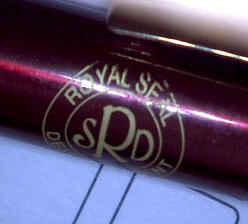
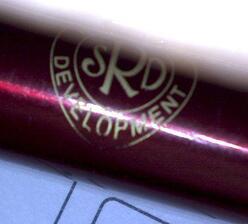
This logo was marked without distortion correction and the distortion at the top and bottom of the logo is severe and makes for an unacceptable product.
The photo below shows a part marked using the distortion correction feature in Prolase 7 Plus software. The result is an accurate representation of the original logo without any of the distortion seen in photos 1 and 2.
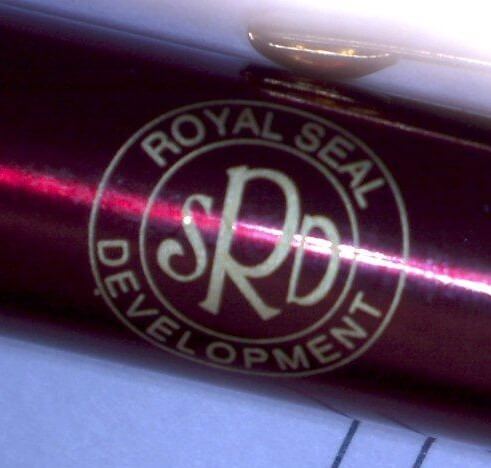
In the promotional products industry, for example, there has always been a need and demand for larger logos on pens. The limiting factor for logo size on this type of product has always been distortion. Problem solved! Any system using any Windows version of Prolase software can be upgraded to Prolase 7 Plus.
Please contact Jim Earman at Jimani for more information about how you can upgrade your current laser with this new software and marking hardware system.
Topics: software, Rotary Laser Marking
.png?width=295&name=footer-logo%20(1).png "Jimani, Inc. Laser Marking Systems and Laser Job Shop")