Skip to content

Laser Marking Software Experience and Expertise to Solve Any Marking Problem

Hero Banner

Prolase 10

Prolase 10 Laser Marking Software is the newest offering from American Laserware. Prolase is known to be the most full-featured laser marking software on the market.

A demo version of Prolase can be downloaded from laserware.com. The demo version is full-featured and, if installed on a Win 7 or Win 10 computer, will allow the user to perform every available software function except marking.

Designed to be both a retrofit package and the original software on new machines, Prolase can support a large variety of galvanometric hardware configurations, including most existing laser marking systems, marking heads, and lasers.

Whether it is for the integrator looking for laser marking software with a richly featured platform flexible enough to support all their marking solutions, or the job shop that demands the highest quality engraving possible, Prolase laser marking software from American Laserware is the right choice and it is why we use it here at Jimani on every laser we build and every laser we use.

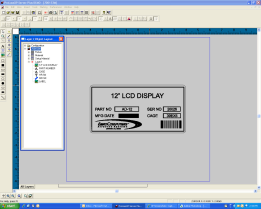
Prolase_Screenshot-resized-261

Text, barcodes, graphics, fonts, fills, automation, importers, parts handling, machine control, interfaces, transformations, and security controls, are all features available:

  • Galvo Interface - Prolase supports direct Analog and Digital control of galvanometers, as well as ScanLab helper cards

  • Laser Interface - Any type of marking laser can be controlled and calibrated.  Virtually any marking application can operate with Prolase.

  • User Interface - The ProLase user interface focuses on the richness of its feature set while remaining intuitive and easy to learn.

  • Object Types - Vector graphics, bitmap graphics, bar codes, serial text, external input, drilling, and micro-machining, and more!

  • Object Control - Sizing, rotation, ring-mode text, line width, hatch fill, kerning, line spacing, step and repeat, and far, far more...

  • Mark Field Control - High-speed motion control system that can be customized to fit the galvanometric and optical situation of any marker.

  • Parts Handler - Digital input and output that can be configured for interlock detection, start mark, aborts, process synchronization, conditional marking

  • Prolase Plus - Prolase Plus adds 4 external axis controls that can run stepper or servo motor systems.  Mark areas larger than the laser field, even around a cylinder 

  • Prolase Toolkit and Prolase Server - Access all the power of Prolase through either an extension DLL interface or through a COM Automation server.

Prolase laser marking software from American Laserware is Jimani's integration choice for our fiber laser marking systems

Leopardmark

Leopardmark Laser Marking Software is the last released version of Prolase 7 Laser Marking Software with all references to Prolase deleted. Leopardmark is offered at a reduced price and is intended to be used as an alternative to the very low-priced laser marking software used in most imported systems.

A demo version of Leopardmark can be downloaded at leopardmark.com. The demo version is full-featured and, if installed on a Win 7 or Win 10 computer, will allow the user to perform every available software function except marking.

Several years ago we made a short video that was intended to jump-start new users in Prolase 7.  This tutorial walks the user through the basic steps of creating a laser marking job. Those steps are identical in Prolase and Leopardmark. You can view the video below.

Prolase 7 Fiber Laser Marking Software Tutorial


Laser Marking Software on our Blog

software Job Shop aluminum ablation Fiber Laser Marking laser marking

How do you build a laser marking recipe library?

   Published On 20 October 2026
Part one of this series covered how to find a working parameter window in an afternoon instead of a week. This article covers what happens to that window afterward, which is where ...
software Job Shop Fiber Laser Marking laser marking

How do you dial in laser marking settings in one afternoon?

   Published On 13 October 2026
Every shop has a version of the same afternoon. A new material shows up, someone starts changing settings and marking test blocks, and by the end of the day there is a scrap plate ...
graphics software FAQ Tiling Fiber Laser Marking Hybrid Laser System rotary part indexer

Large Field Marking with Steered Beam Laser Marking Systems

   Published On 15 September 2026
You have a control panel that is 19 inches wide and a galvo fiber laser with an 8 inch square marking field. The part does not fit. The answer is laser tiling: the artwork gets ...