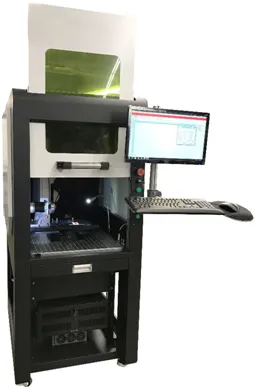
Enclosed Fiber Laser Workstation
Flexibility For Your Production

The Jimani Enclosed Low Cost Hybrid Fiber Laser Marking System is fully enclosed. The Enclosure includes a safety interlocked, up-down sliding door with a large laser safe viewport and hinged, swing out doors on both sides for easy access to the spacious interior.
The system includes the following components:
- Laser Source- JPT Variable Pulse Width MOPA type laser. The standard laser is a JPT Model M7 in either a 30, 60, 80 or 100 watt configuration.
- 1.5X Reversable Beam Expander (read more here)
- Scanhead- Galvo Tech Scan Box 14 with standard XY2-100 interface
- Focusing Lens- Opex F-Theta lens. Marking Field Sizes from 4.7 to 12 inches square
- Control Board- RTC 4
- Software- Leopardmark Laser Marking Software. Prolase Laser Marking Software is available for an additional charge. Both software packages are American Made and Jimani provides unlimited, no-charge operational support.
- Computer- Win 10 Pro 64 bit, 1 TB Solid State Drive, 8 GB ram installed
- Manual Z Axis Enclosed Workstation with 19 inches of Z Axis travel. Optional extended Z axis travel and motorized Z axis control available
- Footswitch for “hands free” laser operation
- Two Year Warranty
- Free Training and System Acceptance at Jimani Facility
- Application and Hardware support from Jimani
- Shipping is FOB Oxnard, CA.
- Power Requirements: 115VAC 15 Amp Service

Enclosed Fiber Laser Workstation Options
- Manual X-Y Table to facilitate of parts placement and fixturing
- Rotary for either “Handshaking” or DCA High Speed Rotary DCA Rotary requires upgrade to Prolase 10 DCA Software
- Fume Extractor- If marked material create excessive smoke or fumes, it is recommended to install some type of fume extraction to provide safety and comfort for the system operator and to protect the focusing lens from contamination