
High Speed, Large Area Rotary Marking
Rotary marking with a galvo-driven laser system can be accomplished in one of two ways. The simple,...
You have a control panel that is 19 inches wide and a galvo fiber laser with an 8 inch square marking field. The part does not fit. The answer is laser tiling: the artwork gets divided into field-sized segments, the part moves under the lens between segments, and the finished mark reads as one continuous piece. Done well, nobody can find the boundaries. Done poorly, every seam shows.
Tiling is what makes large-format work possible on a steered beam system without giving up the speed that made you choose a galvo in the first place. Whether the result looks like one mark or fifteen comes down to three things: part positioning accuracy, focus, and axis alignment.
Steered beam laser markers focus through a flat field or f-theta lens, and that lens sets the size of the marking field. Focused spot size grows in proportion to the field, so doubling the marking field doubles the spot diameter and drops power density to a quarter of what it was. Past roughly 12 inches square, there is not enough power density left to engrave.
Flying optics systems work differently. They move a simple lens over a marking field limited only by the travel of the X-Y drive, which is why they handle large parts without any of this arithmetic. A steered beam system trades that freedom for a fixed optical envelope. The practical working range for detailed marking on a fiber laser lands between 4 x 4 and 9 x 9 inches, and larger fields produce linewidths too broad for fine text and spot sizes too weak for engraving depth.
The Opex f-theta lenses on our Hybrid fiber laser marking systems cover fields from 4.7 to 12 inches square. Most shops running serialization, data matrix codes, and detailed logos settle into the 5 to 8 inch range, because that is where linewidth and power density both stay usable.
Laser tiling divides a marking area into segments no larger than the marking field, then repositions the part under the lens between segments so each tile lands in the correct location. The marking software and the motion system hand off to each other: mark a tile, move the part, mark the next tile. An operator can reposition the part by hand, though a precision motion system will always produce better results.
Tiling stays simple as long as every tile contains discrete, complete marking objects. If no object is split across a boundary, the software and the motion system only need to handshake. The motion system moves the part into position, tells the software it has arrived, and the software marks that tile. Positioning error inside a tolerance of a few thousandths still produces an acceptable part, because nothing has to line up across the seam.
Our systems run Leopardmark as standard and Prolase as an upgrade. Prolase handles the tile breakup itself, taking a single large graphic and segmenting it to the marking field size rather than making the operator lay out each tile by hand.
Speed, mostly, and mark quality after that. A flying optics system has to accelerate the mass of a lens and carriage assembly across the entire marking field. A galvo system rotates a shaft with a mirror on it. That difference makes steered beam markers several times faster, so tiling a large graphic on a galvo system still finishes well ahead of running it in a single pass on flying optics.
There is a real trade-off here and it is worth naming. Flying optics gives you one continuous coordinate system with no boundaries to reconcile. Tiling gives you speed and vector mark quality, and asks you to control positioning error in return. For short-run jobs and production work where cycle time drives the decision, the galvo wins. For one-off marks on very large parts where nothing has to line up, flying optics is often the easier path.
| Factor | Steered beam (galvo) with tiling | Flying optics |
|---|---|---|
| Marking speed | Several times faster; mirror on a shaft | Slower; moves lens and carriage mass |
| Field size | 4.7 to 12 inches square, tiled beyond that | Limited only by X-Y drive travel |
| Boundary handling | Tile seams must be controlled | One continuous coordinate system |
| Best fit | Production runs where cycle time drives cost | One-off marks on very large parts |
The only limits on laser tiling are the space available under the lens and the amount of travel in the axes of the positioning system. We engraved a wall mural 7 1/2 feet long and 2 1/2 feet wide on a 50 watt fiber laser system with a 7.2 inch square marking field, broken into 6 inch square tiles. Part size stops being the constraint once the motion system can reach it.
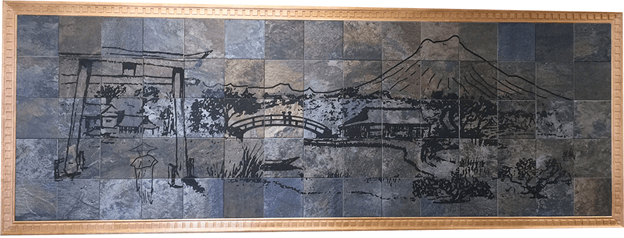
The original image was built as a vector file in HPGL format. A vector file was required because a bitmap would not let the marker draw individual lines with enough overlapping laser pulses to reach the depth the material needed. So the graphic had to be segmented into 6 inch squares, and every continuous line had to connect across tile boundaries. The mural was forgiving in one respect: because the substrate was made of individual 6 inch squares of material, a natural border already existed between tiles, and any line that did not quite meet was masked by that border.
Positioning becomes the entire job. When a graphic element crosses a tile boundary, the two halves have to meet within a laser linewidth or the seam is obvious. Most tiling work is done on single parts larger than the marking field, not on segmented substrates, which removes the natural border that hides small errors. Nineteen inch electronic chassis panels are the common example.
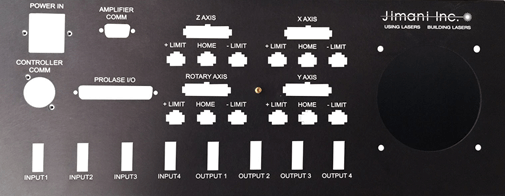
The panel above is used on one of the control chassis for our Hybrid Fiber Laser Marking Systems. Every individual marked element was smaller than the marking field, but laying the panel out as a single graphic and letting Prolase break it into tiles was far easier than building it tile by tile. Several text objects landed on different tiles. In a few cases, individual letters were split between tiles. At that scale, an unconnected or overlapping line segment is the first thing anyone notices.
Assuming the software segments the image correctly, three hardware conditions produce seams: part positioning error, marking field calibration error, and misalignment between the positioning system axes and the galvo axes. A single fiber laser line on anodized aluminum measures roughly .0025 inches wide. Any cumulative error larger than one linewidth shows up as either a gap or an overlap.
Part positioning accuracy comes first, because nothing downstream can correct for it. If the part cannot be placed accurately at each tile location, whether by hand or by a motorized linear drive, there is zero chance of continuous lines meeting across adjacent tiles. Cumulative error is the thing to watch. Small errors that are invisible on a single index become obvious after four or five.
Marking field calibration is the second condition, and focus is the hidden variable inside it. A correctly calibrated field marks any object to the right size within a linewidth, but calibration is performed with the focusing lens at its exact focal point. Put the part somewhere else along the Z axis and the field is no longer calibrated. Too far from the lens and marks come out larger than they should. Too close and they come out smaller. A small focus error turns into a very visible mismatch between adjacent tiles.
Axis alignment is the third. If the X-Y axes of the part positioning system are not exactly parallel to the X-Y axes of the galvo system, connected lines in adjacent tiles will be offset by a distance set by tile size and the angular misalignment between the two. Bigger tiles amplify a small angular error.
Rotary tiling adds two problems that linear tiling does not have. The axis of rotation must run parallel to the galvo axis, because any tilt guarantees seams no software can hide. And marks distort as they wrap around the circumference, growing and stretching the further they travel from the top of the part. Hold rotary tiles to about 30 degrees or less.
Picture a circle marked around a cylinder. As the beam works its way around the curve, the marked circle goes oval and grows in size, because the surface is falling away from the focal plane and the beam is striking it at an increasing angle. Some marking software carries distortion correction schemes, and Prolase Plus includes projection correction, but correction has limits. Smaller tiles produce better results than heavy correction applied to large ones.
Resolution is the other half of the problem. If the rotary device cannot index finely enough, or if the rotary math is based on a part diameter that was measured loosely or varies along the part, seams appear as gaps or as discoloration where tiles overlap. At Jimani, we use rotary encoded servo motors on a Sherline rotary indexer, which resolves 144,000 steps per 360 degrees of rotation. That resolution is what lets adjoining tiles land inside a laser linewidth of each other.
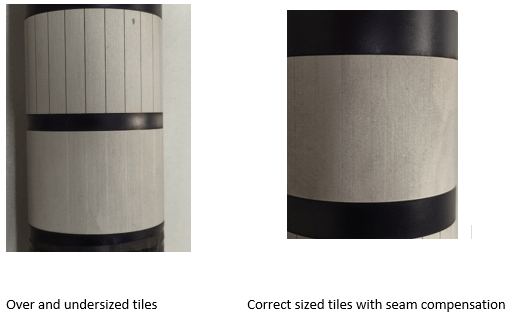
Software can compensate for some amount of seam error, as the two photos above show. Compensation is always covering for a hardware shortcoming, though, and it has a ceiling. The rotary device has to move the cylinder on an axis of rotation that is parallel to the galvo axis, and it has to index with enough resolution to place adjoining tiles inside a linewidth. Get those two right and compensation becomes a refinement rather than a rescue.
More than you think. Size limits on rotary tiling come down to the ability of the rotary device to locate and hold a large part accurately, and the ability of the workstation to focus on the surface of a large diameter part. Unless you are only marking nameplates, you can never have enough Z axis adjustment for focus. Large cylinders eat Z travel quickly.
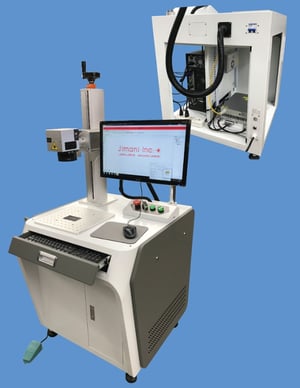
Our Hybrid workstations ship with 19 inches of Z axis travel as standard, with extended travel and motorized Z control available as options. That headroom exists so you can drop the focal point onto a small part and raise it off a large diameter one without rebuilding the fixture every time the job changes.
About 12 inches square is the outer limit, and 4 x 4 to 9 x 9 inches is the useful range for detailed work. Beyond that, the focused spot grows large enough that power density drops below what engraving requires, and linewidths get too broad for fine text, serial numbers, and data matrix codes.
It adds index time between tiles, but a galvo system tiling a large graphic still finishes well ahead of a flying optics system marking the same graphic in one pass. Galvo systems steer the beam with a mirror on a shaft instead of moving a lens and carriage, and that speed advantage carries through the extra moves.
Better than one laser linewidth of cumulative error. A fiber laser line on anodized aluminum runs about .0025 inches wide, so any accumulated positioning error larger than that will show as a gap or an overlap at the tile boundary. Manual positioning works for simple layouts. Split graphics need a precision drive.
Rotary tiling works on cylinders under two conditions. The axis of rotation has to run parallel to the galvo axis, and the indexer needs enough resolution to place adjoining tiles within one laser linewidth. Keep individual tiles to roughly 30 degrees of circumference or less, because marks distort and grow as they wrap away from the focal plane.
You need software that segments artwork to the marking field and handshakes with the motion system. Prolase handles both, including projection correction for rotary work and control of a servo rotary indexer. Laying out tiles by hand is possible for simple parts, but it becomes impractical once objects cross tile boundaries.
Tiling applies any time the artwork exceeds the marking field, which happens on parts as ordinary as a 19 inch electronic chassis panel. It also comes up when a smaller marking field is chosen deliberately, to keep spot size tight and engraving depth achievable on a detailed mark.
Large field marking with galvo systems is achievable, and it is not forgiving of loose hardware or sloppy calibration. If you have a part that will not fit under the lens, send us a sample and we will run it in the job shop before you commit to a system configuration. That is the kind of application we work through every day.